
for Photographers
To qualify for a Business Profile on Google, a business must make in-person contact with customers during its stated hours
**MARCH 2026 – THIS PAGE IS CURRENTLY BEING UPDATED**
Table of Contents
- Lesson 1: Why care about local search?
- Lesson 2: What influences local search?
- Lesson 3: Risks of profile changes
- Lesson 4: How to deal with profile suspension
- Lesson 5: GBP and service areas
- Lesson 6: Physical address VS service address
- Lesson 7: Working with SEO professionals
- Lesson 8: How to Deal With a Brand Name Change
- Lesson 9: How to set up Tracking DO THIS FIRST!
- Lesson 10: 6-Week GBP Challenge
Lesson 1
Why Care About Local Search?
Local search can be a huge source of revenue from local bookings.
If you live in an area that has great wedding venues, it’s one of the fastest and easiest ways to drive traffic.
Results can be seen in weeks rather than months, so there’s faster feedback on your SEO work.
I highly recommend setting up tracking so that you can measure the success of your efforts accurately.
Lesson 2
What Influences Local Search?
Ranking well on Google in the local search results(commonly referred to as the map pack) is mainly influenced by 3 things:
- Relevance
- Prominence
- Proximity
These signals should be findable by Google bot on both your Google Business Profile AND website.
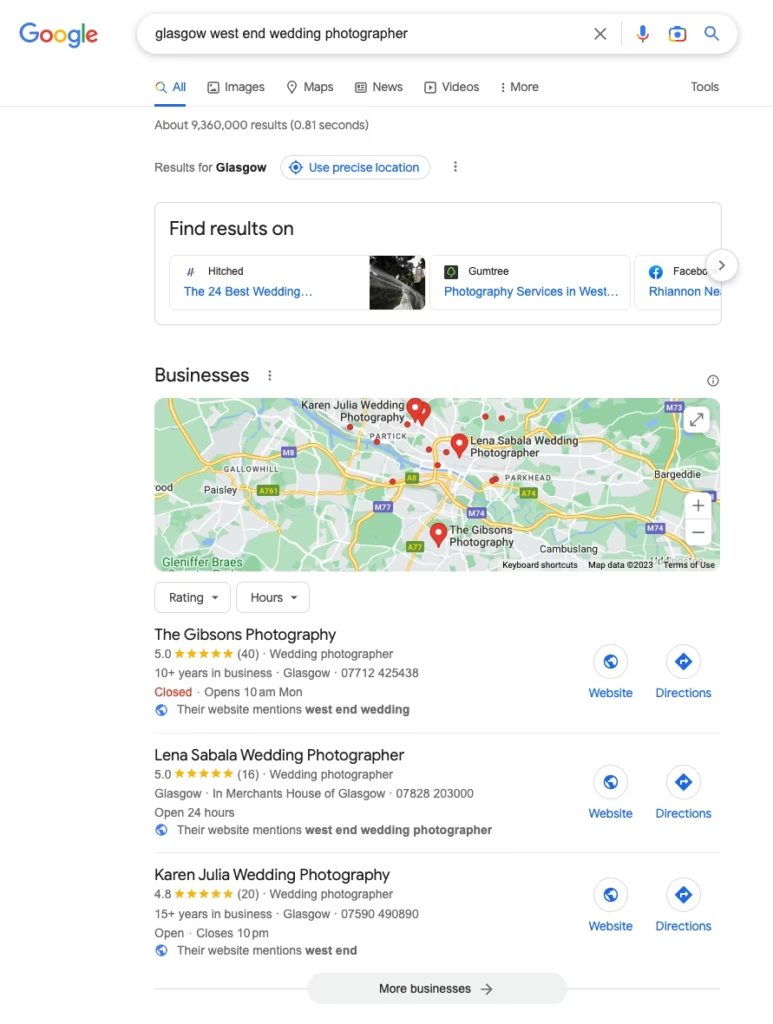
In the screenshot above, you’ll see Google has made a note on each listing confirming that the website shown mentions ‘west end’.
Prior to November 2021, what was mentioned on your website was less influencial, but the algorithm changed at this point and since the update, your website content plays a bigger part in influencing your appearance in local listings.
Lesson 3
Risks of Profile Changes
Google Business Profiles (previously ‘Google my Business’) were historically not well monitored, so as a result there were lots of profiles published that breached the published guidelines, and lots of inaccurate information in the map packs.
Google has been making regular algorithm updates in a bid to clean up the listings, but it’s entirely possible your listing could be breaching the rules, but you may have not been picked up by the algorithm yet.
When you make changes to your listing, this is reviewed by an algorithm, and sometimes a human. A simple change can result in unexpected suspension.
This is why I recommend NOT making changes until a full audit has been completed & website and off-site signals have been updated prior to any attempt to make changes to your profile.
A full Google Business Profile Audit should include:
- Profile information
- Website information
- Off-site signals
REFERENCES
This search engine journal article has info on the November 2021 local search update: https://www.searchenginejournal.com/google-algorithm-history/
Google article on fixing suspended profiles: https://support.google.com/business/answer/4569145?hl=en-GB
This SEO round table article discusses a spike in suspensions around October 2022: https://www.seroundtable.com/google-business-profile-suspensions-increasing-34183.html
Lesson 4
How to Deal With Profile Suspension
If your profile has already been suspended, you may be tempted to reach out to Google support straight away, but I’d advise against appealing suspension straight away.
Before doing anything, you need to work out exactly what the issue is.
Photographers usually get in touch with me for help after they’ve raised a support ticket telling Google they were not doing anything wrong.
In my experience, the chances of being suspended when not breaching any guidelines are extremely low, and on reviewing profiles with photographers, I can usually figure out the problem fairly quickly.
The problem is – if you’ve already sent a strongly worded support ticket, then you’ve already told Google that you don’t understand their guidelines and it’s therefore going to be much more difficult to get your profile reinstated.
Solution for Success
My recommendation is to undertake a full SEO audit of local signals and to fix everything else first before correcting the profile and then submitting an appeal.
Lesson 5
GBP & Service Areas
The Google Business Profile service is designed for local search, rather than non-local search.
Google wants to show local and relevant businesses to those users searching for a local service. This is why proximity signals are so important.
Google says:
The boundaries of your profile’s overall service area shouldn’t extend farther than about two hours of driving time from where your business is based. For some businesses, larger service areas may be appropriate.
If you’re a photographer who covers the whole of the UK, or international locations, then you can still state this on your website, but Google Business Profile is not designed for that scenario, and selecting the whole of the UK in your Google Business Profile will not help you generate local traffic.
Google says:
You can’t set your service area as a distance around your business. If you previously set up your service area in this way, you can’t edit it. Instead, you must specify your service -area by city, postal code or another type of area.
Bear in mind:
- You can have up to 20 service areas.
- The boundaries of your overall area should not extend farther than about two hours of driving time from where your business is based.
Recommended Action
Want to shoot locally?
Choose local service areas in the list. My advice would be to choose as few areas as possible to have a more focussed presence.
Not interested in local bookings?
If local traffic is not what you’re looking for, set the area as you wish and don’t worry about generating traffic from Google Business Profile. Instead, focus your attention on ranking website pages in the search results rather than the local search service.
Lesson 6
Physical Address Vs. Service Address
Service-area businesses on Google
Not all local businesses serve their customers from a brick-and-mortar storefront. Some businesses operate from a home address. Others are mobile and don’t have a storefront that customers visit.
If your business serves customers at their locations, you should list it as a service area business on Google.
Address
Use a precise, accurate address to describe your business location. PO Boxes or mailboxes located at remote locations are not acceptable.
- Make sure that your page is created at your actual, real-world location.
- Use the precise address for the business rather than broad city names or cross-streets. P.O. Boxes are not considered accurate physical locations.
- Suite numbers, floors, building numbers, etc. may also be included. Information like cross-streets and nearby landmarks should only be included in regions where the official street address doesn’t accurately pinpoint the business’s location.
- If you need to specify a mailbox or suite number within your physical location, please list your physical address in Address Line 1, and put your mailbox or suite number in Address Line 2.
- If your business rents a temporary, “virtual” office at a different address from your primary business, do not create a page for that location unless it is staffed during your normal business hours.
- Do not include information in address lines that does not pertain to your business’s physical location (e.g. URLs or keywords).
- Do not create more than one page for each location of your business, either in a single account or multiple accounts.
- Individual practitioners and departments within businesses, universities, hospitals, and government buildings may have separate pages. See specific guidelines about individual practitioners and departments for more information.
- If your address doesn’t have a street number, or you’re sure that you’ve entered the address correctly but the system still can’t find it, you can pin your business’s location directly on the map by following these steps.
Service-area businesses
Service-area businesses—businesses that serve customers at their locations—should have one page for the central office or location and designate a service area from that point. Service-area businesses can’t list a “virtual” office unless that office is staffed during business hours.
Some businesses, like pizzerias that have both have restaurant seating and deliver pizza to customers, are hybrid service-area businesses. These businesses can show their storefront address and designate a service area in Google My Business. If you serve customers at your address and want to set a service area, your business location should be staffed by your team and able to receive customers during its stated hours.
Google will determine how best to display your business address based on your business information as well as information from other sources. Learn more about service-area businesses
Lesson 7
Working with SEO Professionals
Google has specific guidelines for SEO companies and freelancers that work on client Google Business Profiles.
Google wants business owners to be in full control of their business profiles and their guidelines state:
Authorised representatives must, whenever possible, encourage the business owner to create an account, own the Business Profile and add authorised representatives as managers.
With that in mind, if an SEO consultant asks for ownership or offers to set it up for you on their account and not under your own email, they’re going against Google best practices and this is a massive red flag. 🚩
There are further guidelines shown below, full links are included under the screenshot.
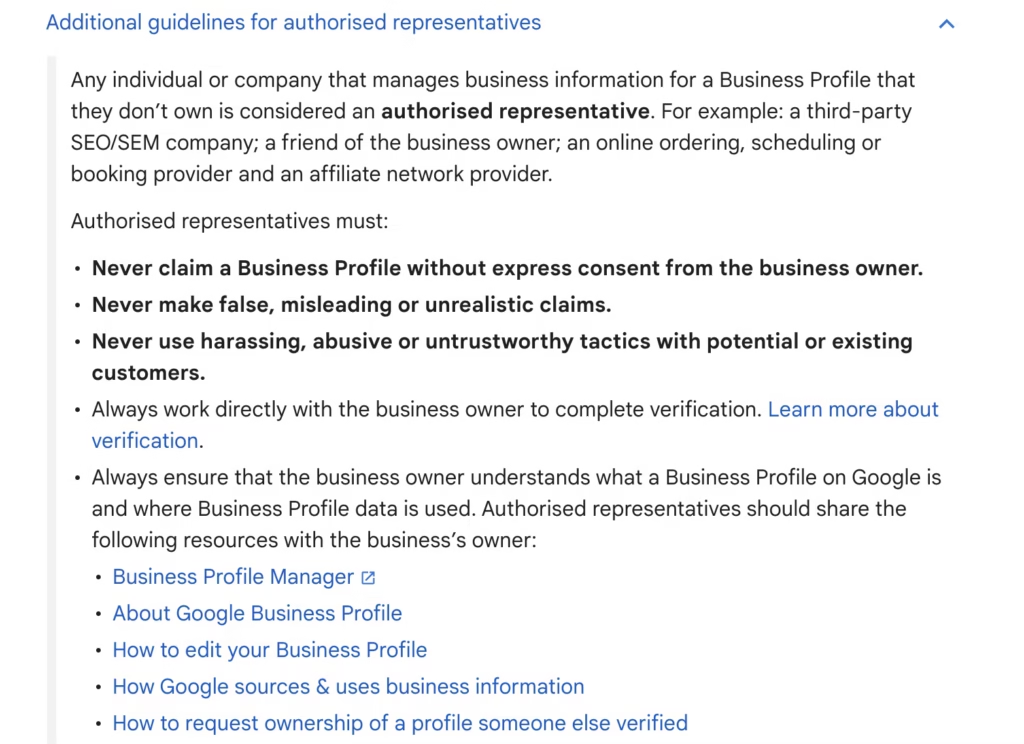
Recommended Reading
- Where to sign up or sign in tp Google Business Profile: https://www.google.com/business/
- About Google Business Profile: https://support.google.com/business/answer/3038063
- How to edit your Google Business Profile: https://support.google.com/business/answer/3039617
- How Google sources and uses business information: https://support.google.com/business/answer/2721884
- How to request ownership of a profile someone else verified: https://support.google.com/business/answer/4566671
- Guidelines for representing your business on Google: https://support.google.com/business/answer/3038177
Lesson 8
How to Deal With a Brand Name Change
If you change your business name, you may be eligible for ‘rebranding’ your Google Business Profile.
This would mean you’d be able to keep your previous reviews.
The criteria to qualify for this is:
Your Business Profile may be eligible for rebranding (defined as an eligible name change without creating a new Business Profile) if you make a minor name change, in which the proper nouns and services described in the business name remain unchanged and the business category remains unchanged.
So, essentially what this means is if you were previously a wedding photographer and your category was ‘wedding photographer’, and you are still offering the same service, just with a different name, then you should qualify to be eligible for rebranding.
Tip: Update all off-site information first (social profiles, citations, etc).
Resource
More info here: https://support.google.com/business/answer/3038177?hl=en-GB#zippy=%2Celigible-businesses%2Cchains-brands
Lesson 9
How to set up Tracking DO THIS FIRST!
Setting up goal tracking is typically low risk and automatically improved. It’s not 100% without risk though, so proceed with caution.
Why You need GBP Tracking
Google does not automatically separate local search traffic from regular SERPS* traffic
This means it can be tricky to assess how much traffic, if any, you’re getting from the local maps-related search results.
Setting up tracking will enable you to see how your profile is performing and measure the success of your local search activity.
Tracking Data Demo
Wondering what you’ll be able to see once tracking is set up? In this tutorial, I share what you’ll be able to see in both Google Search Console and Google Analytics.
This video includes data as shown in the old Universal Analytics (pre-GA4)
What You’ll Need
You’ll need to use Google’s campaign builder tool.
Here’s the link: https://ga-dev-tools.google/campaign-url-builder/
How to Set up Google Business Profile Tracking
GA4 Compatible Tutorial
Lesson 10
6-Week GBP Challenge
Ranking well on Google in the local search results is mainly influenced by 3 things:
- Relevance
- Prominence
- Proximity
In the tasks we’ll be completing in this 6-week challenge, we’ll be looking to increase those signals by choosing a combination of photos and text that help reinforce these.
I highly recommend you complete the Google my Business Optimisation Mini Course first.
If you’re on the pro package you’ll have completed this live as part of your package.
The Phone App
You’ll be uploading photos directly from your phone.
The reason you’ll be using your phone instead of desktop to upload photos is that when uploading from your phone you’ll have the option to add a caption of up to 80 characters.
This caption should be a naturally written sentence containing keywords that build relevance to your targeted locations.
Google Drive
You’ll need a folder on Google Drive for all of your photos, and you should upload sufficient photos before the start of the challenge.
Download the Google Drive app to your phone.
DropBox
If you don’t have Google Drive, an alternative option would be to use DropBox.
Download the app to your phone, then screenshot each photo to get the photos on your camera roll.
Photo Size
I’d recommend having your photos re-sized and re-named with keyword rich and relevant filenames.
Google will resize your photo on upload, so it’s not essential to resize them, but if you upload all of your wedding photos to Google drive you’ll quickly use up the free space.
I recommend sizing photos at 2000 pixels on the longest edge for social media or blog use, and then running these through JPEG mini to reduce the size further.
Copyright
I would highly recommend watermarking the photos you upload to Google my Business. The photos you upload could be shown alongside competitor photos, and I personally think it would be beneficial to have your logo visible.
Having a watermark makes no difference from a ranking point of view.
Compliance
It’s important that all content you upload is unique and there are no duplicate photos. See this Search Engine land article for more info on Google’s latest spam update: https://searchengineland.com/google-updates-business-profile-posts-spam-policies-387006
Resources
JPEG MINI: https://www.jpegmini.com/
We’re going to post 3 photos this week.
It’s best to spread them out by a couple of days.
If you have time, you could post 3 times per day instead of 3 times per week – the important factor is consistency and showing up regularly.
If I’m doing this daily I tend to post once in the morning, then lunchtime, then evening.
Studio Photographers
We want to build your relevance in your local area to increase your rankings in the map pack.
To help with this, you’ll need to namedrop local areas in your photo captions.
Examples:
- A 6-month milestone baby portrait photoshoot for the M. Family from Bonnybridge (79 characters)
- The H. Family from Sheffield have fun during an outdoor autumn family photoshoot (80 characters)
- A newborn portrait from a studio photoshoot in our cosy studio in Glasgow (73 characters)
Wedding Photographers
I’d recommend namedropping wedding venues, areas that include lots of wedding venues, and affluent areas where your target client may be based
Examples:
- Bride walks down the aisle with her dad to meet her groom at Peckforton Castle (78 characters)
- A photo taken of Falcon Manor during a pre-wedding venue visit with my clients (78 characters)
- An exterior photo of [insert venue] wedding venue whilst I was exploring [insert city]
Summary
The aim for this is NOT to have lots of views on these photos. WE ARE NOT AIMING FOR VIEWS. I know that may seem strange. Views certainly do no harm, but photos views is not our target here.
The main aim of this is to have your website shown across a wider geographical area at a higher rank.
This can be helped by posting regularly, and ensuring the regular content you post is relevant to the areas you want to be shown in.
The grid below shows the map pack rankings for my wedding photography website.
The coloured dots are 0.25 miles apart.
I have posted content to my Google my Business profile in my local area in the West End of Glasgow.
In this area I rank in the top 3 positions in the map pack.
We can see that in the city centre, my map ranking position is much lower. This is because I have not posted any relevant content from that area.
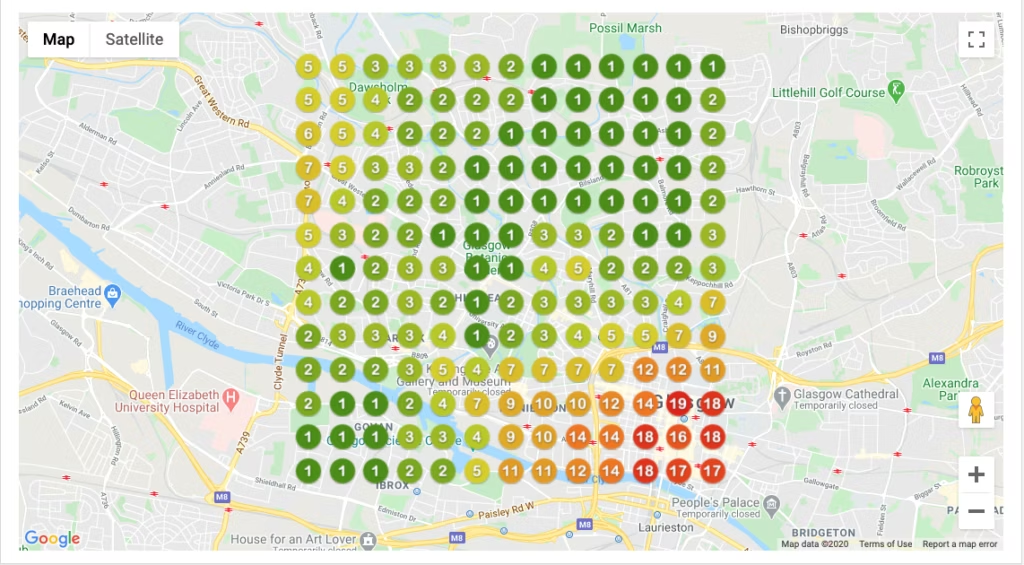
The main aim of posting photos regularly is to build both relevance and prominence to help you appear higher in the map pack and to help increase the chances of Google showing your website more often to searchers in your target areas.
GMB Software
GMB Performance tracking as shown above is available from software company Local Viking.
This software also enables you to add geo tags for locations, and post scheduling.
deally, you’d keep this going consistently, week in, week out.
If you’re pressed for time though, start it up again a couple of weeks before peak times to make the most of the increase in traffic.
I recommend new businesses repeat the 6-week challenge for at least 6 months minimum.
Resources
Recommended Reading
(these are the same articles linked in the ‘working with SEO professionals’ lesson)
- Where to sign up or sign in tp Google Business Profile: https://www.google.com/business/
- About Google Business Profile: https://support.google.com/business/answer/3038063
- How to edit your Google Business Profile: https://support.google.com/business/answer/3039617
- How Google sources and uses business information: https://support.google.com/business/answer/2721884
- How to request ownership of a profile someone else verified: https://support.google.com/business/answer/4566671
- Guidelines for representing your business on Google: https://support.google.com/business/answer/3038177
Course Tutor
Hey! I’m Karen! I’m a wedding photographer and SEO consultant, specializing in coaching other photographers to help their businesses get found online.
I usually work live on video calls with clients, that way I can optimize the technical stuff whilst photographers learn about how Google works, and how they can use algorithms as an awesome match maker, rather than being an obstruction. I’ve been able to help lots of clients grow their traffic, and I’d love to help you too!
I hope you find the tutorials that I’ve put together useful. Enjoy!

Want to Chat About Working Together on Your SEO?
I’d love to help you improve your SEO rankings so that you can get more traffic from your ideal clients.